Your Books. Your Computer. No Subscriptions.
Stop paying $30/month to categorize your spending. LocalBooks is desktop bookkeeping that learns how you organize your finances, works offline, and never sends your data to the cloud. Buy once, own forever.
30-day money-back guarantee Windows 10/11 No account needed
Tracking Your Finances Shouldn't Cost $30 Every Month
Whether you're a freelancer, a side hustler, or running a small home business — you just need a simple tool that works without the recurring bill.
Monthly fees add up
Mint is gone. QuickBooks charges $30+/month. That's $360/year just to categorize your spending. In 3 years, you've spent over $1,080 — and you still don't own the software.
Your data lives on their servers
Cloud apps mean your income, expenses, and bank details sit on someone else's computer. One breach, one policy change — and your personal financial records are at risk.
Overcomplicated for what you need
You don't need payroll integration, inventory tracking, or 200 features you'll never touch. You need to track income, categorize expenses, and see where your money goes. That's it.
Everything You Need. Nothing You Don't.
Import a bank statement and categorize a month of transactions in under 5 minutes.
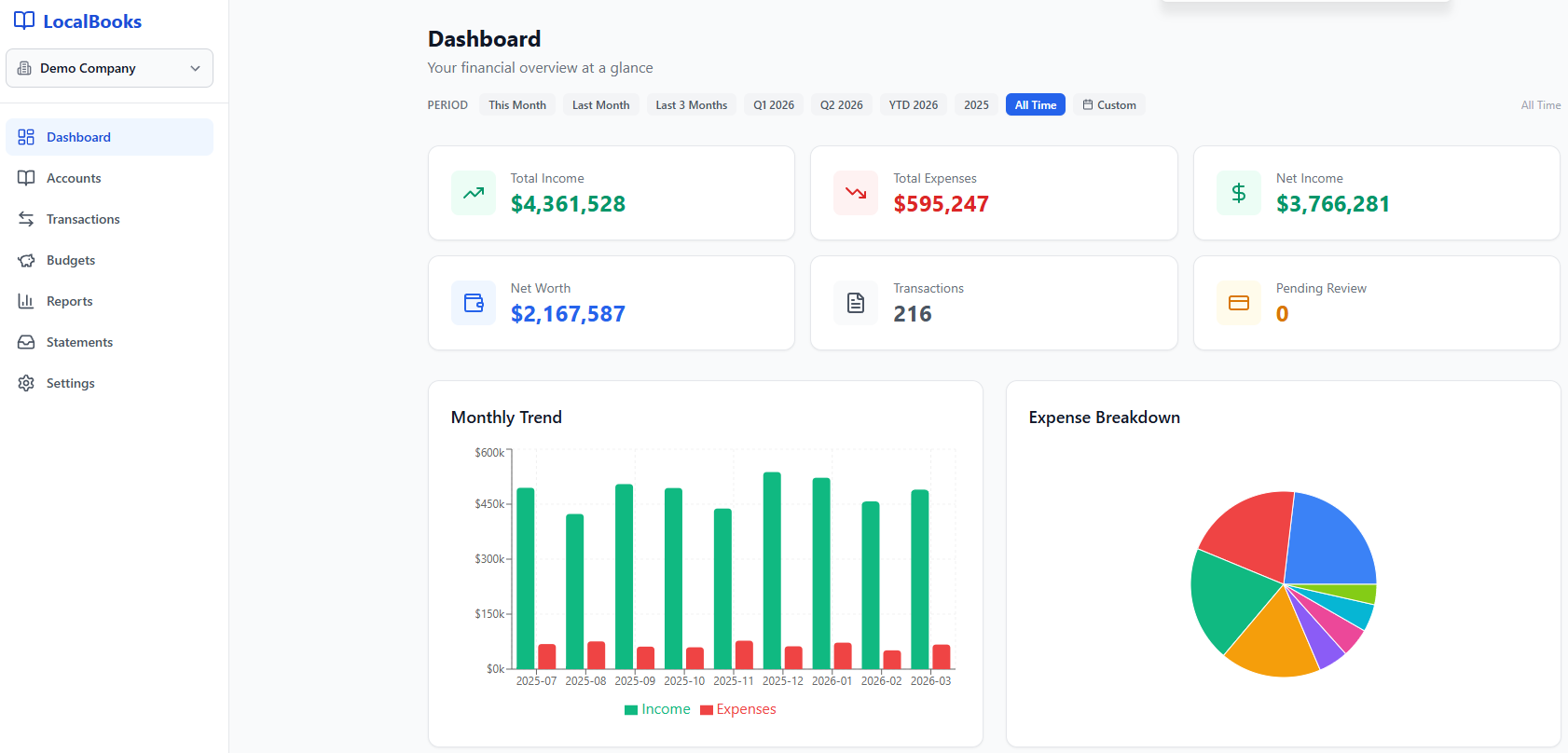
See where your money goes — at a glance
Open the app and instantly see your total income, expenses, and net worth. Monthly trends show you the big picture, while the expense breakdown reveals exactly where every dollar went.
- Income, expenses & net worth KPIs
- Monthly trend charts
- Expense breakdown by category
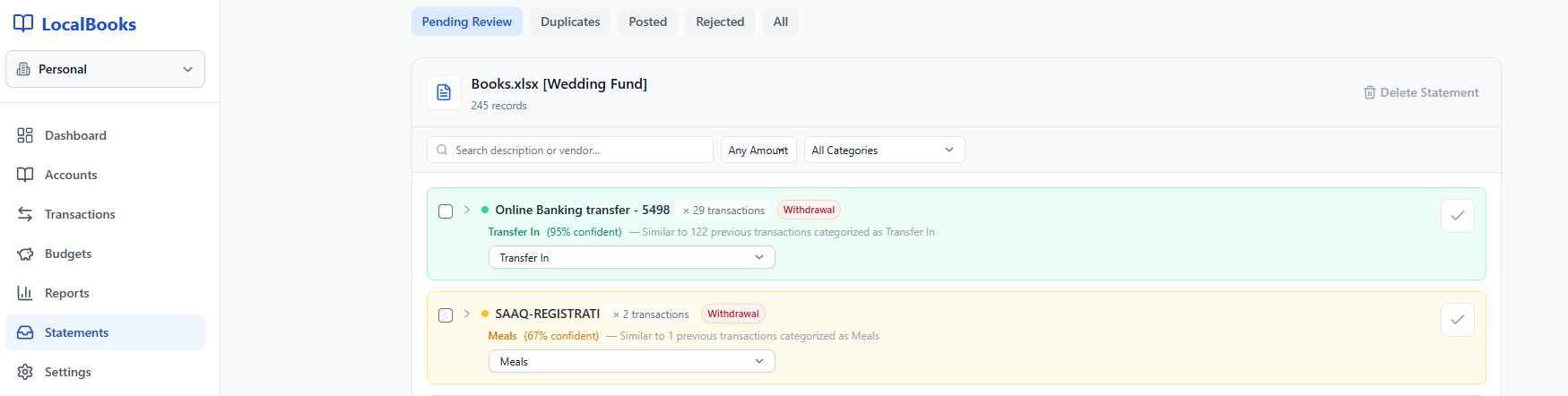
It learns how you categorize — so you don’t have to
Import a bank statement and LocalBooks suggests categories based on your past decisions. It shows you the confidence level and how many similar transactions it’s seen before. Accept with one click, or override — it learns either way.
- Confidence scores on every suggestion
- Learns from every transaction you categorize
- Less manual work every month
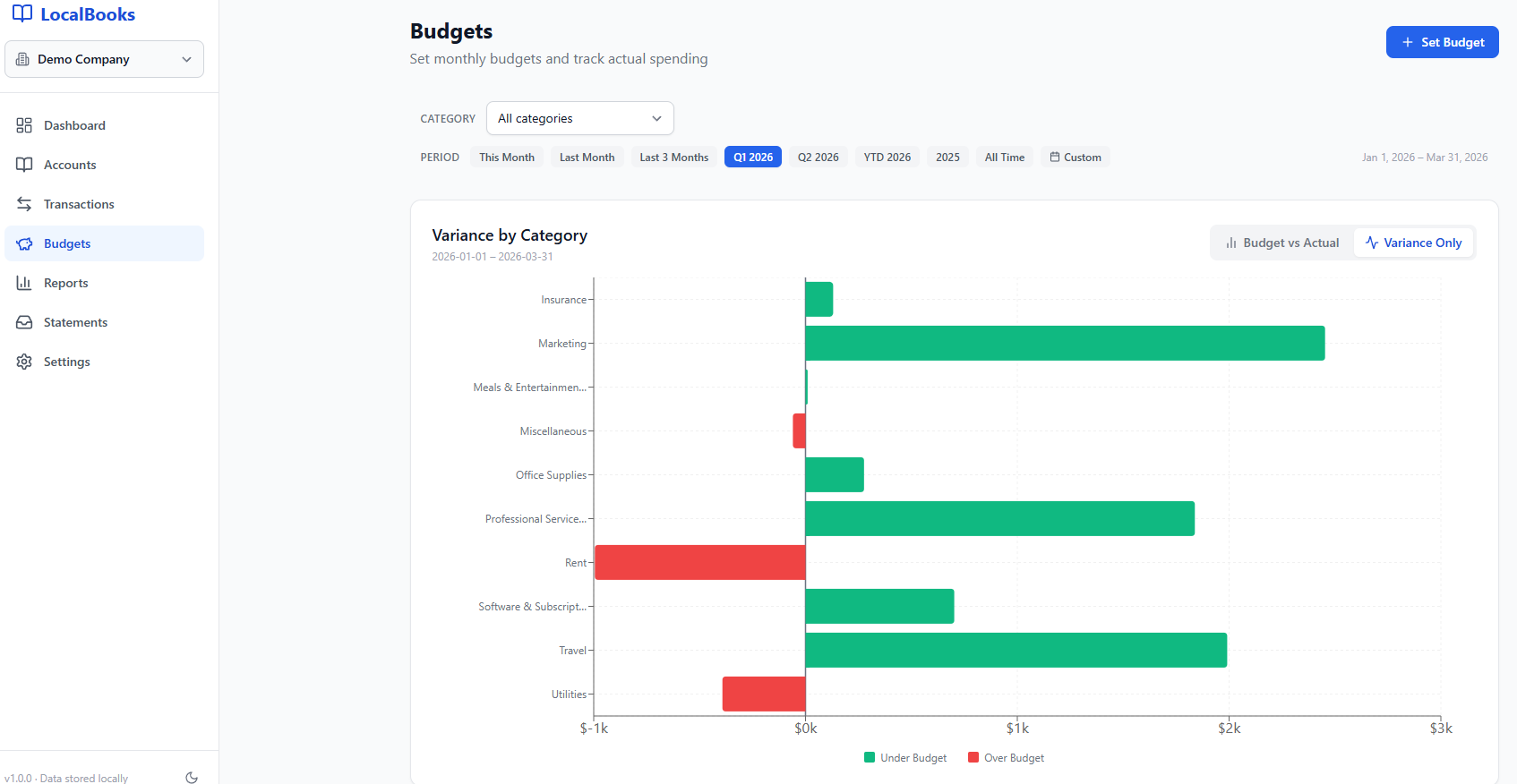
Set spending limits. Stay on track.
Set monthly budgets for each category and instantly see where you're under or over. The variance chart makes it obvious which areas need attention — green means under budget, red means over.
- Budget vs actual by category
- Visual variance chart (under/over)
- Filter by period — monthly, quarterly, yearly
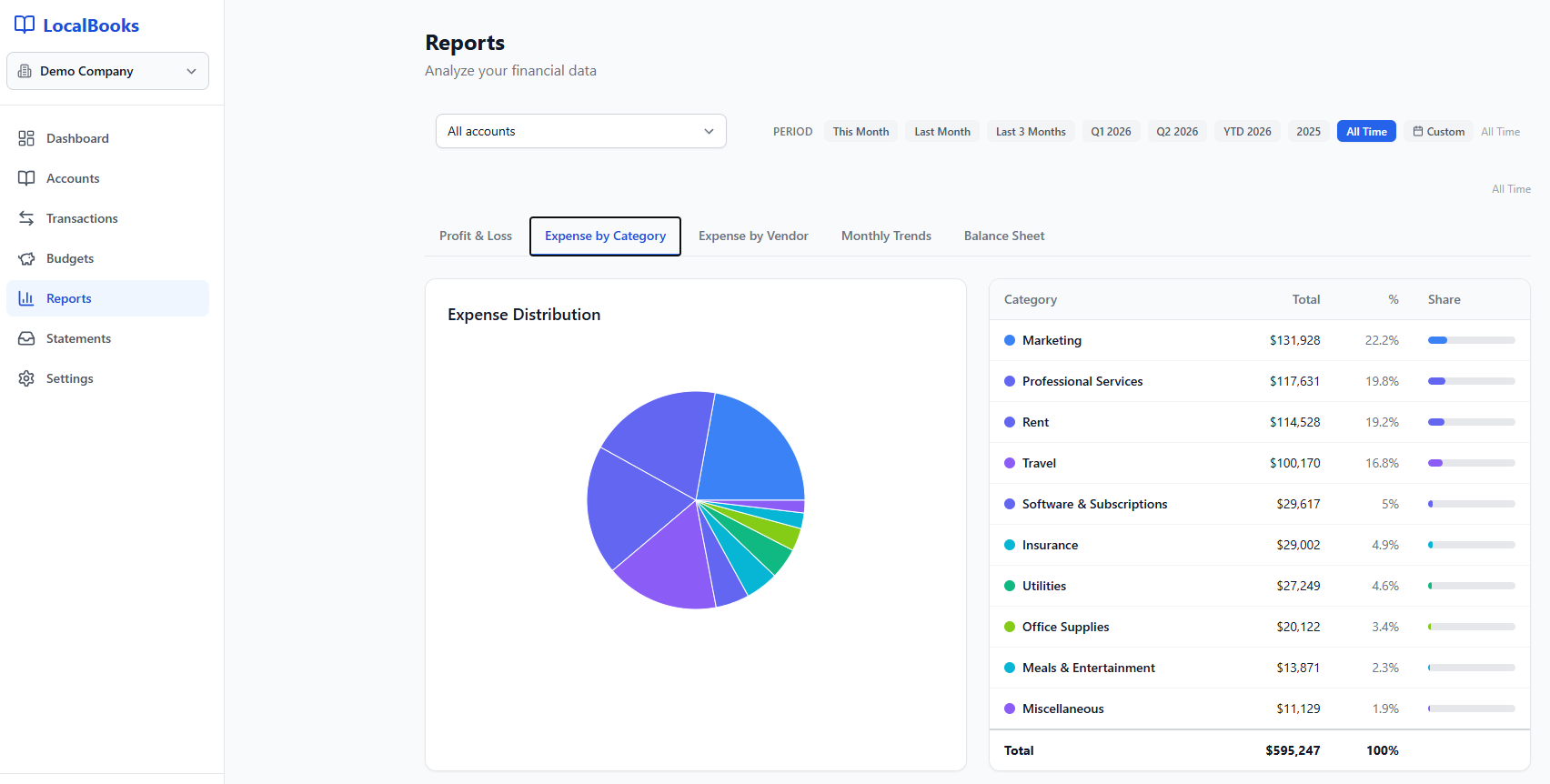
All your reports, one click away.
Generate clean Profit & Loss, Balance Sheet, and expense reports with one click. See spending breakdowns by category or vendor — exactly what your accountant needs, without the last-minute scramble.
- Profit & Loss, Balance Sheet
- Expense by category & vendor
- Monthly trends over time
Built for People Who Value Their Time and Privacy
Everything you need to track your finances. Nothing you don't.
Smart Categorization
Import your first bank statement, categorize a few transactions, and LocalBooks learns the rest. Next month, most of your transactions are already categorized. The more you use it, the less you do.
Bank Statement Import
Drag and drop your PDF or CSV bank statements. LocalBooks reads them automatically and categorizes your transactions. We intentionally don’t connect to your bank — your credentials stay yours.
Dashboard & Reports
See your income, expenses, and net worth at a glance. Generate clean reports for yourself or your accountant at tax time.
Privacy First
Your financial data never leaves your computer. No cloud sync, no tracking, no third-party access. Period.
Backup & Restore
One-click backup to any drive. Restore anytime, even preview historical states without affecting your live data.
Free Updates Forever
Buy once, get every future update for free. New features, improvements, and fixes — all included. No upgrade fees.
Up and Running in 2 Minutes
Buy
One-time $49.99 payment. Secure checkout via Stripe. No account required.
Download
Get the Windows installer instantly. One file, under a minute to install.
Start Bookkeeping
Launch the app and start tracking. Your data stays on your machine. Always.
How LocalBooks Compares
See why people are switching from subscription software to something they actually own.
| LocalBooks | QuickBooks Online | Wave | Spreadsheets | |
|---|---|---|---|---|
| Cost | $49.99 once | $30+/month | Free* | $150+/year |
| Data on your computer | ||||
| Bank statement import | PDF auto-import | Bank API | Bank API | Manual |
| Works offline | ||||
| Reports & budgets | Limited | Manual | ||
| Smart categorization | Self-learning | Limited | ||
| Account required | No | Yes | Yes | N/A |
| 3-year total cost | $49.99 | $1,080+ | Free* | $450+ |
*Wave is free but displays ads and shares your financial data with third parties for revenue.
Trusted by Individuals Who Take Their Finances Seriously
"I used Wave for two years until they got acquired and everything changed. LocalBooks does what I actually needed — minus the ads, the cloud, and the uncertainty."
"As a freelancer, I don't need 200 features. I need to track income, categorize expenses, and hand my accountant a clean report at tax time. LocalBooks nails it."
"The bank statement import alone is worth it. I drag in my PDF statements and transactions are categorized automatically. Finally know exactly where my money goes."
One Price. No Surprises. No Subscriptions.
Everything included. Pay once, own it forever.
One-time payment · Lifetime access
*Launch price applies to the first 100 customers only. Updated Apr 3, 2026 at 6:00 AM.
- All features included
- Free updates forever
- Unlimited transactions
- Multi-company support
- No cloud fees, ever
- 30-day money-back guarantee
Secure checkout via Stripe
Common Questions
Is LocalBooks a good alternative to QuickBooks for small businesses?
Do I need an internet connection to use LocalBooks?
What bank statements can LocalBooks import?
Is my financial data secure with LocalBooks?
What happens if I need help or have a problem?
Will LocalBooks work on Mac?
Can I import data from QuickBooks or other software?
What is included in the $49.99 price?
Ready to Own Your Books?
Join the people who stopped renting their bookkeeping software. One payment. Yours forever.
Get LocalBooks — $49.99 USD Once30-day money-back guarantee · Secure payment via Stripe